KS0255 Keyestudio Bluetooth 4.0 Expansion Shield

Introduction:
The keyestudio Bluetooth 4.0 shield is an integration of sensor shield and HM-10 Bluetooth-4.0, fully compatible with UNO R3. So it is very easy to stack it onto the UNO R3 board.
The shield has extended all the digital and analog pins out into 3PIN, simple to connect the sensor using 3PIN wire.
It also come with a HM-10 Bluetooth-4.0 used for Bluetooth communication. The slide switch is used to control the power supply for Bluetooth.
Onboard is set with jumper cap, default by communicating the Bluetooth module to UNO R3 serial port. If connect two jumpers, need to set the virtual serial port for UNO R3 board, that is D2 to TX, D3 to RX.
Features:
Extends 14 digital pins into 3PIN
Extends 6 analog pins into 3PIN
Comes with a reset button
Comes with a slide switch to control the Bluetooth communication
Comes with jumper interface to control the serial communication pin (default built-in serial port, can select the analog serial port, TX to D2, RX to D3.)
Comes with a Bluetooth 4.0 module
Bluetooth 4.0 Parameters:
Terminal block spacing: 3.5mm
Bluetooth protocol: Bluetooth Specification V4.0 BLE
No byte limit in serial port Transceiving
Realize 100m ultra-distance communication with iphone4s in open field.
USB protocol: USB V2.0
Working frequency: 2.4GHz ISM band
Modulation method: GFSK(Gaussian Frequency Shift Keying)
Transmission power: -23dbm, -6dbm, 0dbm, 6dbm, can be modified by AT command.
Sensitivity: ≤-84dBm at 0.1% BER
Transmission rate: Asynchronous: 6K bytes ; Synchronous: 6k Bytes
Security feature: Authentication and encryption
Supporting service: Central & Peripheral UUID FFE0, FFE1
Power consumption: Auto sleep mode, stand by current 400uA~800uA, 8.5mA during the transmission.
Power supply: 5V DC
Working temperature: -5 to +65 Centigrade
Technical Details:
Dimensions: 54mm x 48mm x 23mm
Weight: 19g

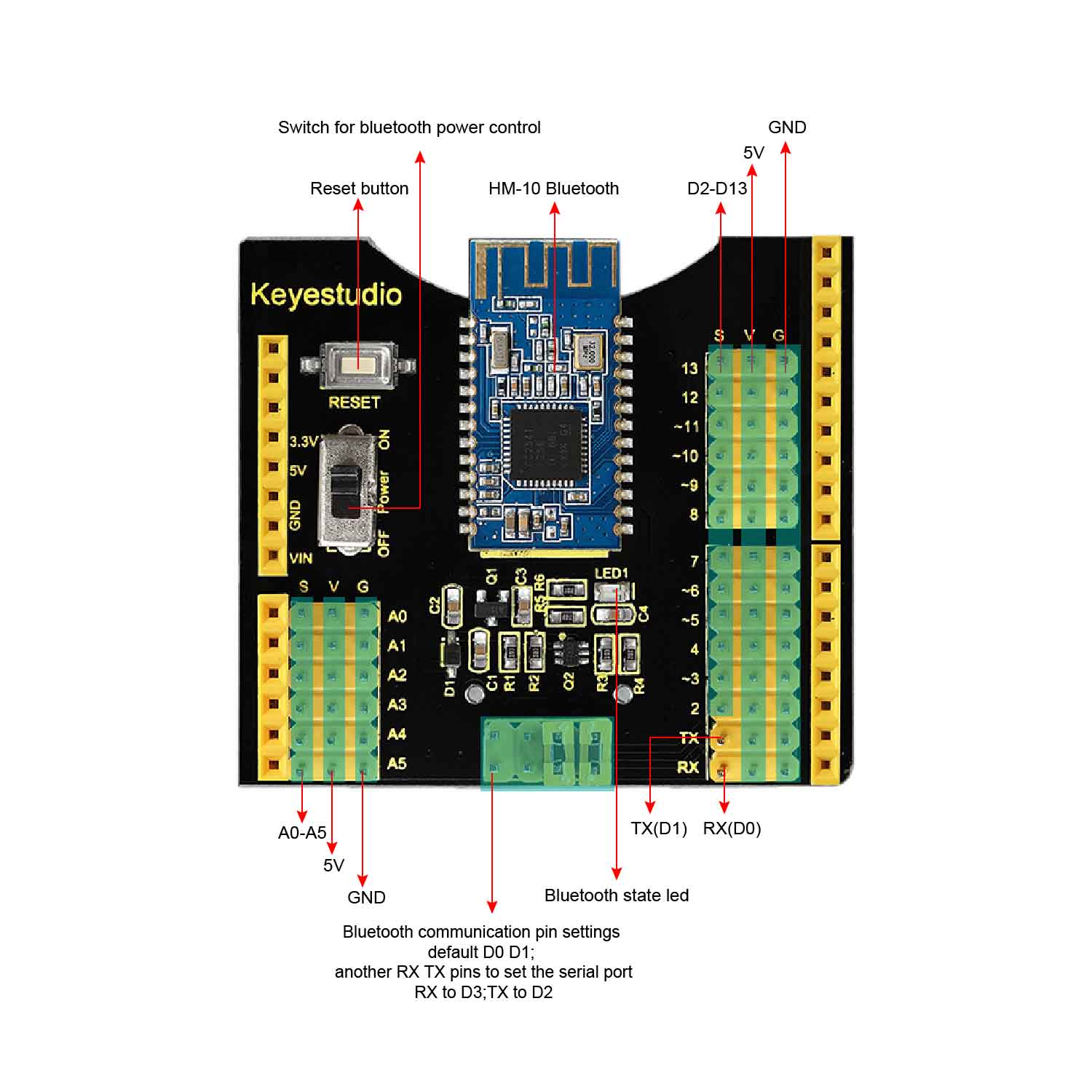 PINOUT Guide:
Test Code:
/////////////////////////////////////////////////////////////
int val;
int ledpin=13;
void setup()
{
Serial.begin(9600);
pinMode(ledpin,OUTPUT);
} void loop()
{ val=Serial.read();
if(val==’a’)
{
digitalWrite(ledpin,HIGH);
delay(250);
digitalWrite(ledpin,LOW);
delay(250);
Serial.println(“keyestudio”);
}
}
/////////////////////////////////////////////////////////////
Example Use:
Stack the shield onto keyestudio UNO R3 board, power up and upload the code.
Turn on the slide switch to power the HM-10 Bluetooth-4.0.

Then open the APP HC-COM, search device and pair the Bluetooth device. If connected, the LED on the Bluetooth module is normally on.
Enter an “a” on the HC-COM, then click Send, it will display “keyestudio”. Every time sends an “a” , Pin13 LED on the board flashes once.


You can download the APP HC-COM from the link below: